Choosing a Shopify Power BI connector: six things to check
Power BI has no built-in Shopify connector. Check these six points before you pick one, from refresh in the Power BI service to order history and row limits.
Shopify is missing from the Power BI connector list. Microsoft maintains that list, and it covers hundreds of sources, from Salesforce to SQL Server. If you want your store numbers next to accounting and purchasing in Power BI, you either build the connection yourself or pick a third-party connector.
This article is for the second group. You know you want a connector and you are comparing a few. Below are the six points where connectors differ most, with how Power BI Connector Pro handles each one.
The six points in one table
| Check | Why it matters | Power BI Connector Pro |
|---|---|---|
| Refresh in the Power BI service | A driver on your own PC needs a gateway | OData feed, scheduled refresh in the service verified |
| How much data fits | A row limit per table cuts off a year of order lines | Up to one million current rows per store |
| Order history | Shopify gives 60 days by default | 59 days today, older orders awaiting Shopify approval |
| Tables and custom fields | Margin and returns need more than the order export | Orders, order lines, returns, stock, conversion and custom fields |
| Failed updates | A half-updated report is worse than an old one | The previous completed data stays in place |
| Data outside Power BI | Finance sometimes wants SQL or a CSV | CSV and JSON, plus PostgreSQL from Professional |
1. Does refresh work in the Power BI service?
Refreshing a report in Power BI Desktop is easy. The hard part starts when you publish it and colleagues open it in the browser. Then the Power BI service has to fetch the data on its own.
Connectors come in two kinds. One is a driver you install on a Windows PC or server. To refresh that source from the Power BI service, you need an on-premises data gateway: Windows software that keeps running on a machine in your network. The other kind delivers the data online, and the Power BI service reads it directly.
If you build your own connection to the Shopify API, watch out for URLs that Power Query assembles while the query runs. Microsoft says reports with these dynamic data sources can’t be refreshed in the Power BI service in most cases.
Power BI Connector Pro delivers an OData feed with its own username and password per export. Imports and scheduled refresh in the Power BI service have been verified. Your Microsoft license decides how often you refresh: eight times a day on shared capacity, up to 48 on Premium, Premium Per User or Fabric.
2. How much data fits?
Many connectors charge by rows or by table. In the first month a limit looks generous. After a year you have several order lines per order, plus refunds and stock changes, and part of your data drops out without your report telling you.
Ask for the limit per table and per plan, and check it against last year’s orders.
Power BI Connector Pro charges by the number of orders your store receives each month: up to 1,000, up to 10,000 or unlimited. Every plan supports up to one million current rows per store and 5 GB per update. Historical imports and extra reports do not count an order again.
3. How far back does order history go?
Shopify gives apps access to orders from the last 60 days by default. For older orders an app needs the read_all_orders scope, and Shopify approves that per app. A connector that promises a full year either has that approval already or gets the data another way. Ask which.
Power BI Connector Pro imports orders from the last 59 days today. The request for older orders is with Shopify. If your first report needs a year-over-year comparison, plan for that.
4. Which tables and fields do you get?
The Shopify order export puts one row per line item. That works for a revenue chart. For margin per product, return rates or stock per location you need more tables, linked correctly.
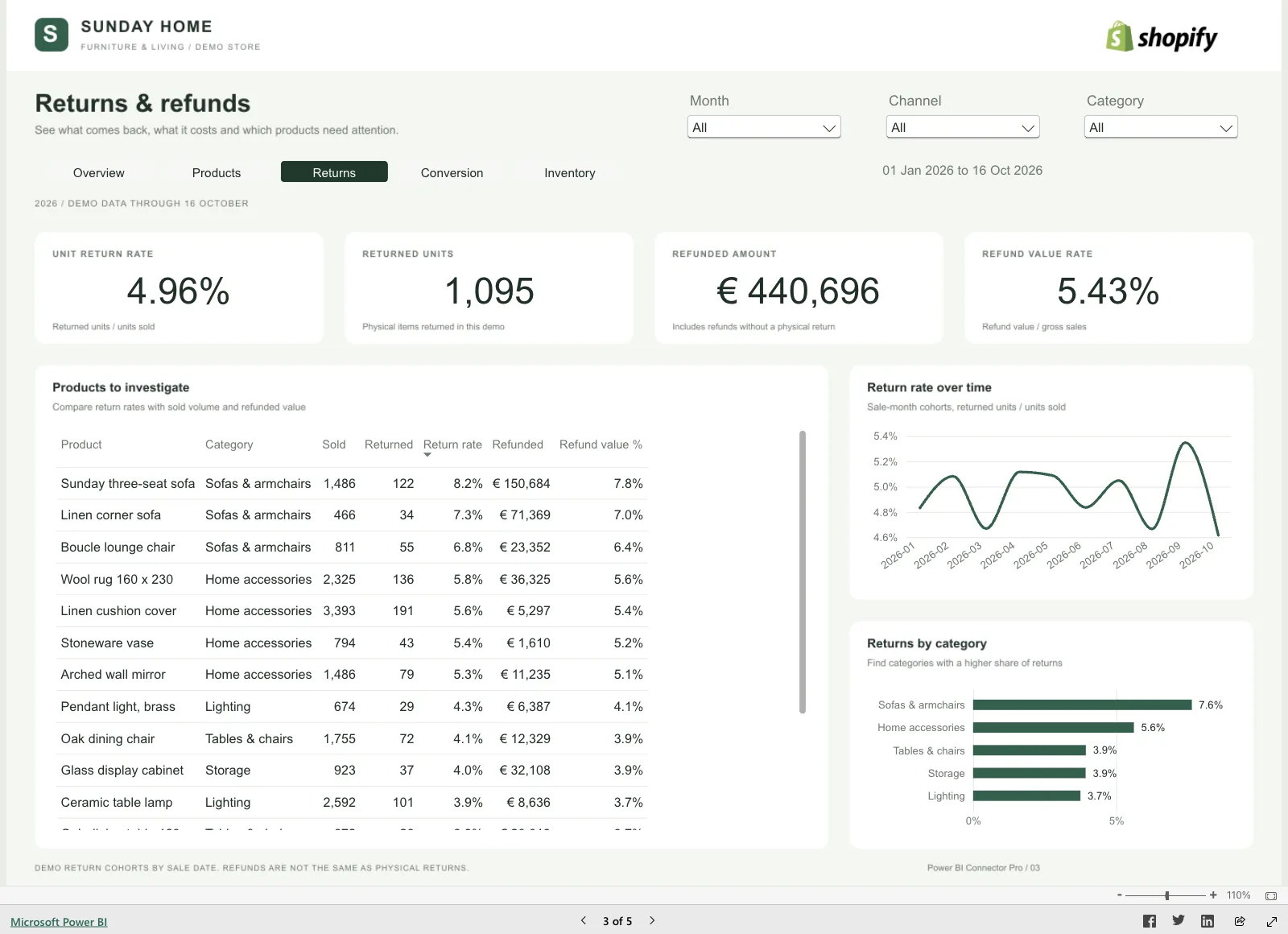
With Power BI Connector Pro you choose the tables and fields in Shopify:
- orders, order lines, discounts, refunds and payment information;
- return requests with requested, processed and refunded quantities and the return reason;
- stock by product, variant and location;
- visits, carts and checkouts per day, by device and traffic source;
- the extra fields you use on products, variants and orders.
The report starter gives you linked tables, calculations and report pages for your selection. You can explore it in the live demo with the Sunday Home figures.
5. What happens when an update fails?
Every connection fails at some point: a timeout at Shopify, a table that grows too large. Ask what your report shows then. A report with half of today’s orders leads to wrong decisions. Yesterday’s report with a clear date is better.
Power BI Connector Pro only releases an update once it is complete. If an update fails, Power BI reads the previous completed data. The app shows when the last update finished.
6. Can you use the data outside Power BI?
Teams that start with Shopify data in Power BI often want it elsewhere too: a check in Excel, a query from a developer, a link to the ERP.
With Power BI Connector Pro you download any table as CSV or JSON. On Professional and Plus, the connector also delivers your tables to a PostgreSQL database you control, up to three on Plus. After each completed update, the connector replaces its own tables there. Keep long-term history in your own separate tables.
When to pick something else
A connector isn’t always the cheapest route. If you need one analysis, for a year-end close or an investor, a CSV export from Shopify is enough. If you already run a data warehouse with a data engineer and want Shopify alongside ten other sources, a pipeline tool such as Fivetran or Airbyte fits better.
Power BI Connector Pro is built for the team in between: you already report in Power BI, you want fresh store numbers every day and nobody on the team wants to maintain an API connection.
What it costs
| Plan | Monthly | Yearly | Orders per month | Own database |
|---|---|---|---|---|
| Starter | $29 | $290 | Up to 1,000 | Not included |
| Professional | $79 | $790 | Up to 10,000 | 1 PostgreSQL database |
| Plus | $199 | $1,990 | Unlimited | 3 PostgreSQL databases |
Every plan starts with a 7-day free trial. Yearly billing costs the same as ten months. Power BI Connector Pro is opening access ahead of its public Shopify App Store release. You request access from Newcraft, which makes the app.
For more on refresh schedules and how they relate to your Power BI license, read Microsoft Planner in Power BI: what a dashboard takes. For every route from CSV to the API, see Newcraft’s guide to connecting Shopify to Power BI.
Sources
- Connectors in Power Query, Microsoft Learn
- On-premises data gateways in Power BI, Microsoft Learn
- Data refresh in Power BI, Microsoft Learn
- OData Feed connector, Microsoft Learn
- Access scopes: read_all_orders, Shopify