Heliview Kanban
All your Planner boards in one view
Planner shows you one board at a time. If you coordinate several teams, you want them side by side. Heliview puts tasks from multiple boards into one view, with the filters Planner doesn't have across boards.
Sign in with your Microsoft work account. From €99 per month, with unlimited users.
Planner works per board. Your job doesn't.
Every team has its own board, and that works for the team. As a team lead or coordinator, you need to know what's happening everywhere. So you open board after board and keep the overview in your head or in a spreadsheet.
- You can't see which tasks are due this week across all teams at once.
- You find out late that the same person has work on three boards in the same week.
- Filters and views apply to one board, never to the whole picture.
What you do with Heliview
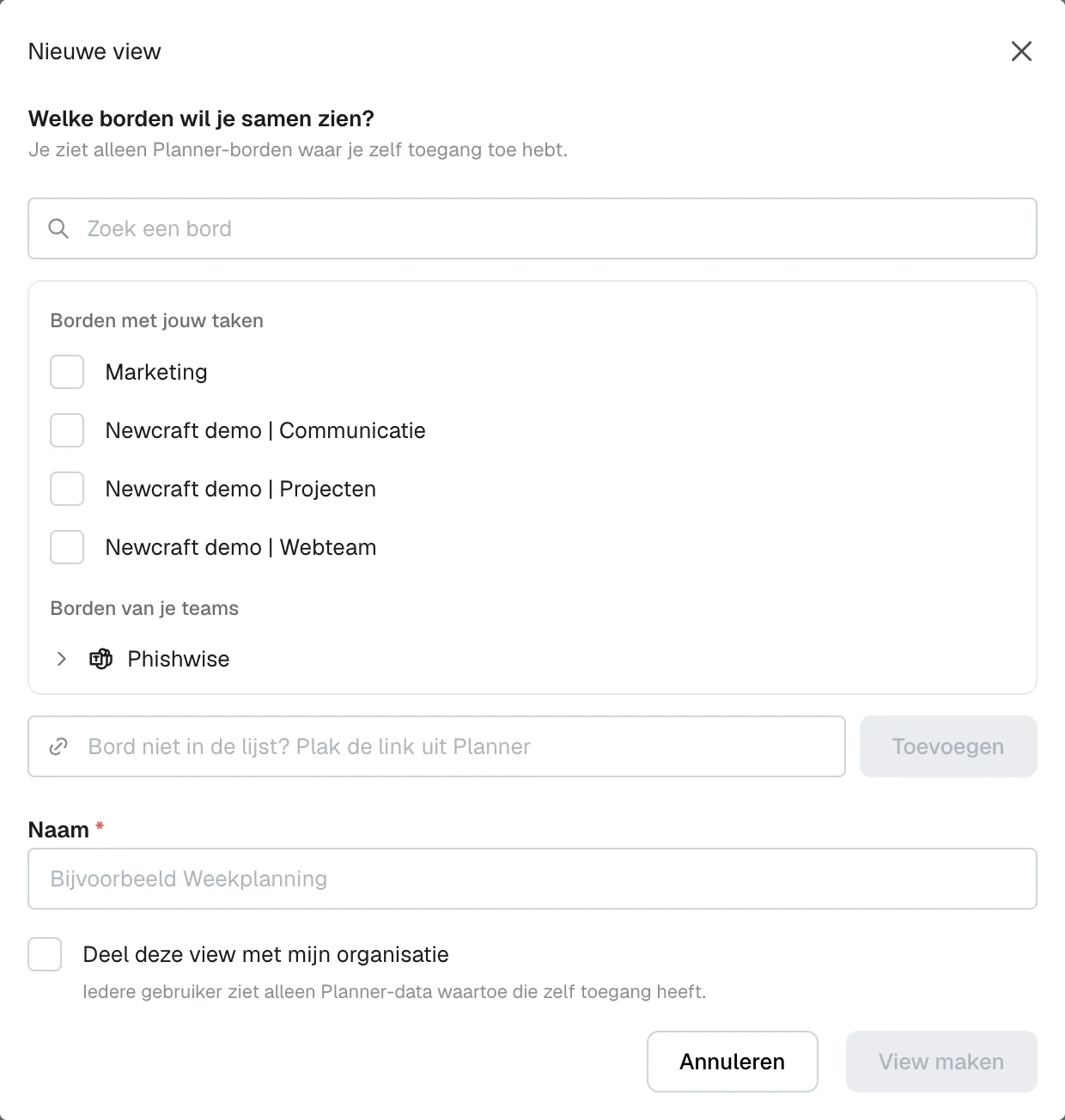
You choose which Planner boards belong together. Heliview calls that a view.
Several boards in one view
Combine tasks from different Planner boards. Keep a view for yourself or share it with your organization.
Board, list, timeline or calendar
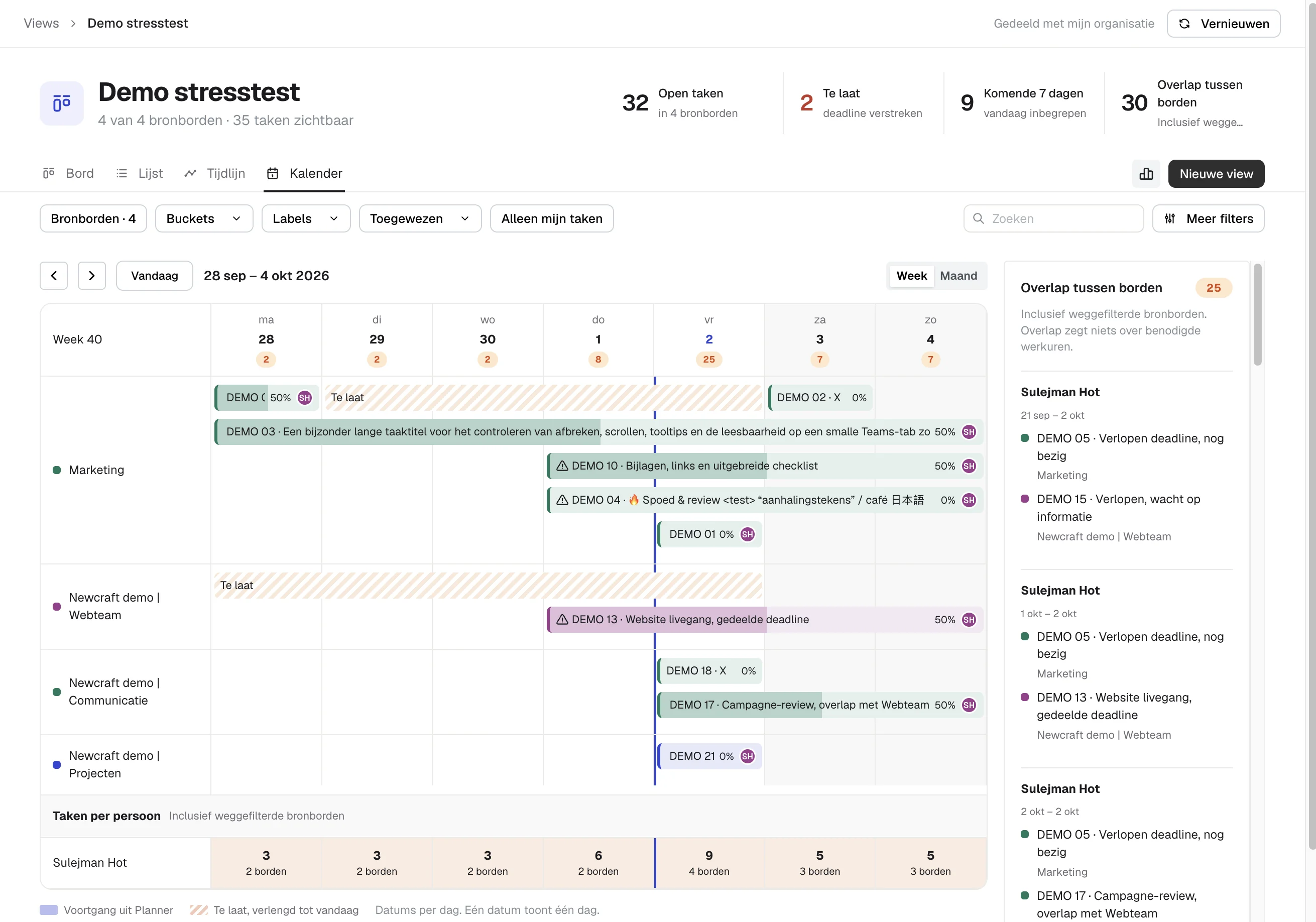
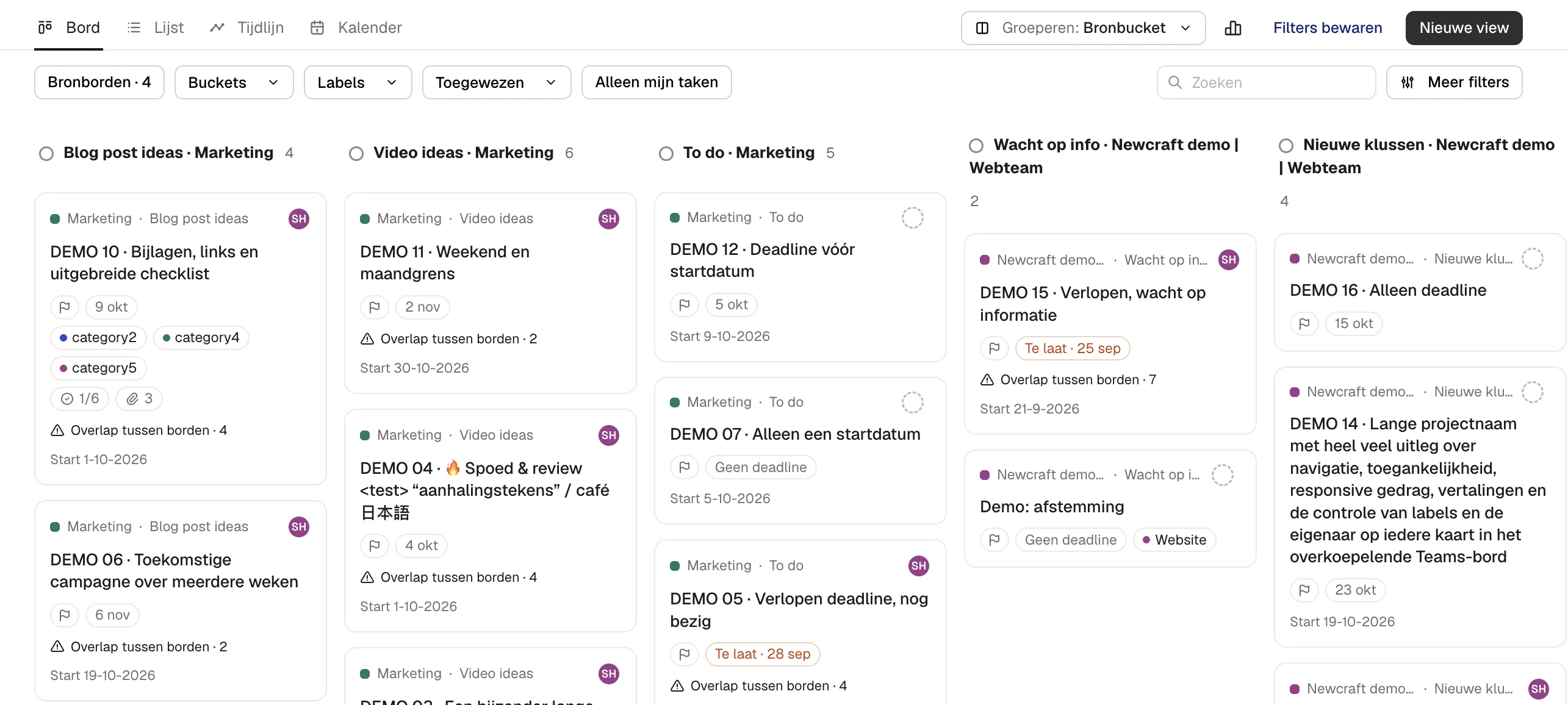
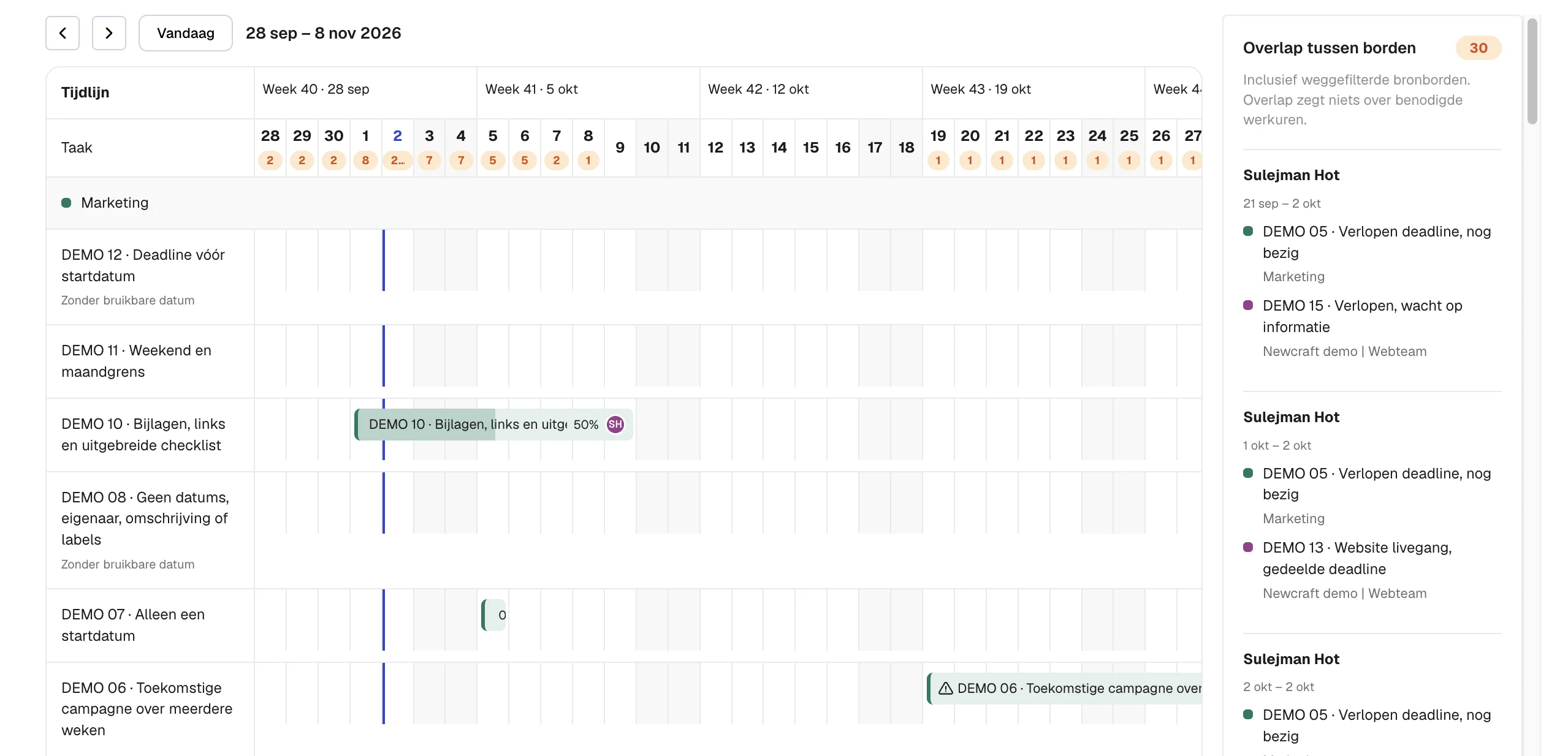
Look at the same tasks as columns, a list, a timeline or a week or month calendar. Collapse the columns you don't need right now.
Filters that stay put
Filter by source board, bucket, label, assignee, due date, progress and priority. Group and sort, and save your filters per view.
Overlap between boards
See when someone has tasks on different boards in the same period, so you spot a double workload early.
Task details close at hand
Open a task to read the description, checklist, attachments, links and comments without switching to Planner.
Bulk edit across boards
Select up to 50 tasks from different boards and give them a new due date, owner, progress, priority or label in one go. You see what changes before anything is saved.
What it looks like
How it works
-
Sign in with Microsoft
Go to heliview.advisign.nl and sign in with your work account. The first person from your organization becomes the owner and approves new colleagues.
-
Pick your boards
Create a view and add the Planner boards you want to see together. Then choose board, list, timeline or calendar.
-
Use it where you work
Open Heliview in the browser or as a tab in a Teams channel. Share the view with your organization when colleagues need the same overview.
Your tasks stay in Planner
Heliview works on top of Planner. It is not a second task system.
- Your own permissions
- Heliview uses the Planner permissions of the person using it. If you can't see or change something in Planner, you can't in Heliview either.
- Sharing a view shares no access
- When you share a view, colleagues get no extra Microsoft access. Everyone sees only the tasks they can already open in Planner.
- No copy of your tasks
- Heliview keeps no task database of its own. Tasks stay in Planner, and when you edit one, the change goes straight to Planner.
- Encrypted sign-in
- The Microsoft tokens Heliview uses to open Planner are stored encrypted on the server.
Pricing
You pay for the number of Planner boards. Users are always unlimited.
-
5 boards
€99 per month
€1,089 per year
- Unlimited users
- View tasks as board, list, timeline and calendar
-
10 boards
€149 per month
€1,639 per year
- Unlimited users
- View and edit tasks
- Bulk edit up to 50 tasks across boards
-
Unlimited
€299 per month
€3,289 per year
- Unlimited users
- Unlimited boards
- View and edit tasks
- Bulk edit up to 50 tasks across boards
- Prices exclude VAT.
- The same Planner board in several views counts once. The view itself doesn't count.
- Try it for 7 days without payment details. Then choose whether to subscribe. Without a subscription, you pay nothing and access stops.
Where Heliview stands today
You can use Heliview in the browser today, with a 7-day free trial. The Microsoft Teams Store listing has been submitted and is waiting for Microsoft's review. We'll update this page when it's live.
- Price
- From €99 per month
- Where
- Browser and Teams channel
- Teams Store
- In review
- Languages
- English, Dutch, French, German
Frequently asked questions
Do I need a special Microsoft license?
You sign in with your Microsoft work account. Heliview shows the Planner boards that account can already open.
Does Heliview copy my tasks?
No. Heliview reads tasks from Planner when you look at them. There is no second database with your tasks.
Can colleagues with a shared view see my boards?
Only if they already have access to those boards in Planner. A shared view shares the view's settings, never access.
Who manages Heliview in my organization?
The first person from your organization becomes the owner and approves new colleagues before they can get in.
Is Heliview in the Teams Store?
Not yet. The listing has been submitted and Microsoft is reviewing it. Until then, use Heliview at heliview.advisign.nl.
How much does Heliview cost?
You pay per number of Planner boards, not per user. 5 boards cost €99, 10 boards €149 and unlimited €299 per month, excluding VAT. Paying yearly gets you one month free.
How does the trial work?
The 7 days start with your organization's first Microsoft sign-in. No payment details are required. After that, access stops unless you choose a subscription. Payment and automatic renewal start only when you subscribe.
Can I edit tasks in Heliview?
Yes, on the 10 boards and Unlimited plans. Changes go straight to Planner. You can also change up to 50 tasks from different boards at once, with a preview of what changes first. On the 5 boards plan you view tasks.
How do you count boards?
Every Planner board in a view counts. The same board in several views counts once. The view itself doesn't count.
Which languages does Heliview support?
The app is available in English, Dutch, French and German.
Read more about Heliview
- Microsoft Planner in Power BI: what a dashboard takes Power BI has no built-in connector for basic Planner plans. Compare the Graph API and Power Automate routes, license costs and refresh limits before you build.
- Planner vs Planner Premium: what each license gets you Basic Planner comes with Microsoft 365. Plan 1 costs $10 and Plan 3 $30 per user per month. Compare views, dependencies and portfolios, and see when to upgrade.
- Bulk edit Planner tasks across multiple plans at once Planner can only bulk edit tasks inside one plan. Here's how to give tasks on several Planner plans a new due date, owner or label in one go.
- Can you collapse or hide buckets in Microsoft Planner? A Planner board with lots of buckets gets crowded fast. Planner can't collapse or hide buckets. Here are the workarounds that do work, and how to collapse columns in Heliview.
- How to build a master plan from all your Planner plans: 4 options compared Want one plan with every task from your teams? You can copy tasks with Power Automate, build a portfolio, keep a central list or use a view. Here's what each option costs you.
- A Planner calendar across multiple plans, now that the Outlook feed is gone Planner's Schedule view works per plan, and the feed that put plans in your Outlook calendar was switched off in early 2026. Here's how to get one calendar with tasks from all your plans.
- Microsoft Planner portfolio vs plan: what you need A Planner plan holds tasks, a portfolio groups premium plans. See the license a portfolio needs, what it shows and how to get an overview of basic plans.
- How to see all tasks assigned to someone across Planner plans Planner shows your own tasks across every plan, but not a colleague's. Here's how to see what one person has on all their Planner plans, with and without an extra app.